
In your first 30 minutes with Claude Haiku 5.5, aim for one useful result: a clearer email, an organized task list, or a short summary you have checked and can use. This guide shows you how to choose a task, write a focused prompt, review the draft, and make one targeted revision. Along the way, I share a household-and-work planning session that took just under 28 minutes—and produced a plan I followed the next day.
The time blocks below are suggested budgets, not a promise that setup or every task will fit into thirty minutes. If you need longer to sign in, prepare your notes, or check an answer, take that time. The goal is to finish with something useful and understand what still needs your judgment.
As a content and efficiency coach at a small education company, I prefer starting with work whose requirements are easy to inspect. A short note or draft email gives you a clearer first experiment than a broad request to “make me more productive.”
What You Need Before You Start
A Claude account and access to the web or mobile app.
Access to Claude Haiku 5.5 in your model selector.
One short, non-sensitive task you already understand.
Your original material available beside the response.
A clock, if you want to follow the suggested time budget.
Anthropic currently lists Haiku 5.5 as selectable for Free, Pro, Max, Team, and Enterprise users on web, iOS, and Android. Access remains subject to usage limits and account or workspace settings. Check the model shown before starting; do not assume every Claude conversation uses Haiku. Official availability information.
If the model is unavailable, check your current account conditions. You can practice the general method with another available model, but record that difference rather than calling it a Haiku 5.5 test.
Minute 0–5: Choose One Task You Can Check
Pick a task with a short input and a clear definition of success:
Organize a messy note without changing dates or commitments.
Rewrite an email while preserving its meaning.
Combine three short updates without adding information.
Avoid starting with unfamiliar research or a decision whose accuracy you cannot judge. Also avoid private student, customer, or household information. Use fictional material while learning if the real input is sensitive.
For this guide, we will use an illustrative task note:
Send the revised handout Friday at 3 p.m. The introduction must be approved before sending. Return the school form, but I need to check its deadline. Buy groceries; timing is not decided.
Success means preserving the deadline and approval condition, keeping groceries unscheduled, and flagging the missing school-form deadline. It does not mean producing a complete weekly calendar.
Minute 5–15: Prepare and Send One Complete Request
Put the task, instructions, constraint, and source material in a single message. Check the message before sending so you do not accidentally ask the model to act on an incomplete brief.
You can copy this prompt:
Organize my notes into a practical action-list draft.

Return three sections:
1. Fixed commitments and explicit dependencies
2. Unscheduled tasks
3. Questions to resolve

Rules:
Use only the information in my notes.
Preserve stated deadlines and conditions exactly.
Do not invent priorities, durations, owners, or missing details.
If you suggest an order, label it as a suggestion and explain
which information in my notes supports it.
Keep the answer short enough to check beside the original.

Notes:
[Paste the short note here.]
Add a relevant constraint if you have one. For example: “I have ninety minutes available tomorrow morning, but I have not estimated task durations.” This describes availability without giving the model permission to invent how much work fits.
Focused instructions make the task clearer. They do not guarantee compliance, so the next step is verification.
Minute 15–22: Review Facts Before Tone
Keep the original material beside the answer. First check completeness and meaning; then consider wording and presentation.
For the sample note, use these criteria:
Check | What a suitable draft preserves |
|---|---|
Completeness | Handout, school form, and groceries all appear |
Deadline | Friday at 3 p.m. remains unchanged |
Dependency | Approval of the introduction comes before sending |
Missing information | The school-form deadline remains a question |
Unscheduled work | Groceries receive no invented date or duration |
Next, check whether the draft introduces unsupported priorities or commitments. An organized list can still be misleading if it turns “timing not decided” into a scheduled task.
For a rewrite, check that a warmer tone has not weakened a requirement or added a promise. For a summary, look for omissions as well as new claims.
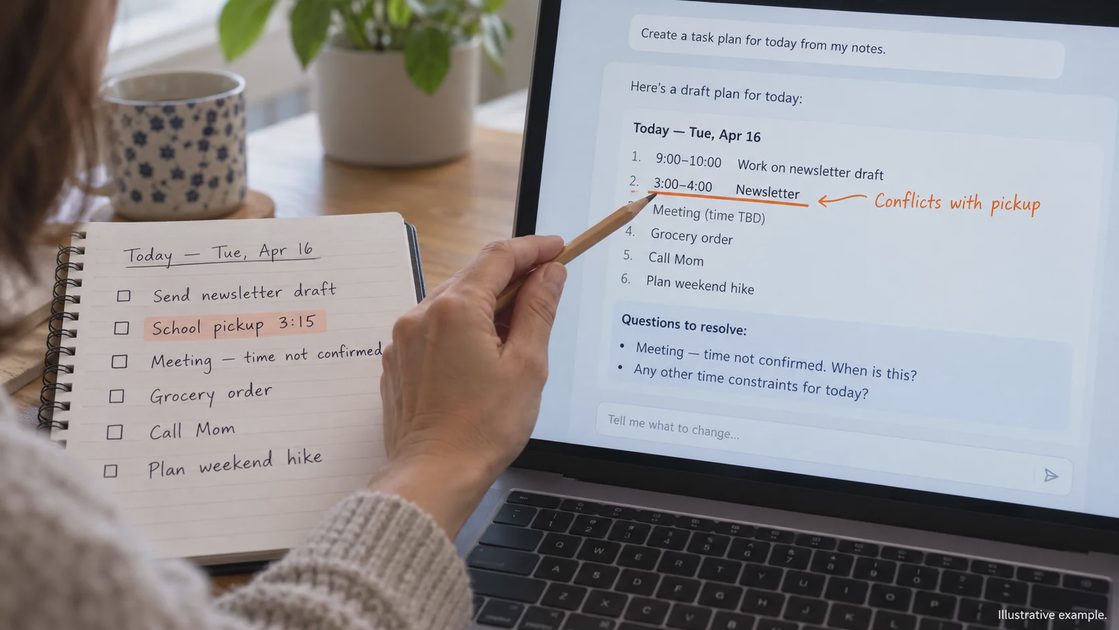
I would make three brief notes: what is usable, what needs correction, and what prevents using the draft. That keeps the review tied to the task rather than a general impression of how impressive the answer sounds.
Minute 22–28: Request One Targeted Revision
Choose the most important problem and name it directly. “Make it better” gives little guidance about what should change.
If the model invented a date, try:
You scheduled the school form for Thursday, but my notes do not
provide its deadline. Remove that date and put the deadline
under Questions to resolve. Preserve the other stated facts.
If the facts are correct but the answer is too long, ask for a shorter version while explicitly preserving deadlines, conditions, and unknowns.
Compare the revision with both the first draft and the original input. A correction can fix one problem while introducing another. Shortening can also remove a condition that previously appeared correctly.
In my early tests, Haiku 5.5 usually handled simple corrections well. More complex or multi-part revisions sometimes required a third pass or manual fixing. That is normal. The goal of the first 30 minutes is not perfection; it is learning how the model responds to ordinary instructions and ordinary follow-ups.
Do not spend the entire session repairing a small task. If repeated corrections are necessary, stop and record that the workflow needs redesign or may not be worthwhile for this use.
A Realistic Sample Session (Anonymized Shape)
Here is the shape of a session I ran with ordinary household-and-work material (details changed for privacy):
Goal sentence:
“Turn this brain-dump list into a realistic plan for the next three workdays, accounting for school pickup and one meeting.”
Instructions + constraint:
“Prioritize by urgency and energy required. Do not invent new tasks. I have limited evening time and pickup at 3:15 each day.”
First output:
A clean numbered list with rough time blocks. Two items were given optimistic time estimates. One low-priority task was ranked too high.
My review notes:
Useful structure. Needed two time estimates corrected and one priority swapped.
Revision request:
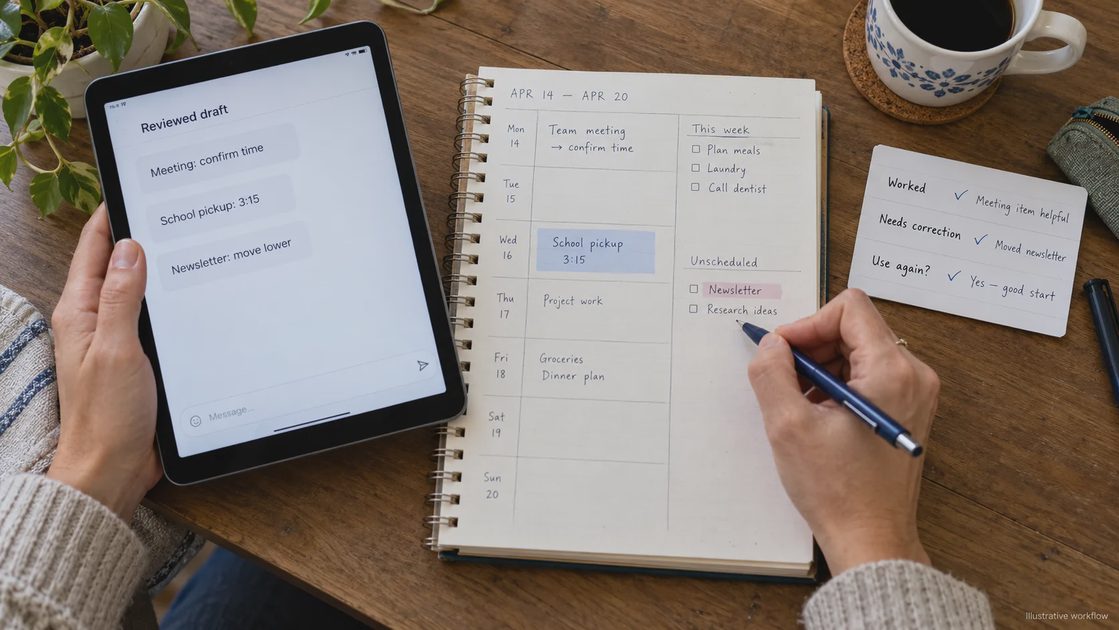
“Adjust the time estimates for items 2 and 4 to be more conservative. Move the newsletter task lower.”
Second output:
Closer. Still required one manual tweak, but usable as a working plan.
Total time: just under 28 minutes. Result: a plan I actually followed the next day, with human judgment still firmly in place.
Minute 28–30: Save the Result and Your Decision
Copy the reviewed output into the tool you already use. For this first session, transfer items manually rather than connecting a calendar or enabling automatic actions.
Check the handoff: an accurate date in the chat can still be entered incorrectly elsewhere.
Then record three short lines:
What helped on this task?
What required correction or additional information?
Would I repeat this workflow, change it, or do the task manually?
Count preparation, review, revision, and transfer when considering the effort. A quick response alone does not establish a time saving.
When I Would Use This—and When I Would Not
I would use this approach for a bounded, low-stakes task whose output I can compare directly with the source. It is a practical way to learn prompting and review without building a complicated system.
I would not use it for unchecked consequential decisions, material I am not authorized to share, or a task I cannot evaluate. A more capable model does not remove the need for verification.
If I were too tired to review, I would postpone the experiment or choose a simpler manual method.
Try one short task today. Keep the original beside the answer, make one targeted revision if needed, and judge the reviewed result. Continue with Turn a Brain Dump Into a Practical Action List With Claude when you are ready to handle more ambiguity.
Make the useful part easy—and keep a human in the loop.

No letters yet — be the first to write.